
FL Studio Mobile
Image-LineMusic & Audio
4.06.51K Reviews
- Version
- 4.10.19
- Installs
- 1.00M
- Age Rating
- Everyone
Screenshots
Our Review of FL Studio Mobile
 Analysis by Appyee
I like making music on a phone most when an idea is still fresh: a rhythm tapped out while waiting, a melody that arrives on a walk, or a sketch I want to hear before I forget it. FL Studio Mobile is built for that kind of hands-on music creation, but it is more than a quick beat toy. It gives you a place to arrange sounds into a track and keep shaping the result, which makes it appealing if you want to work on music rather than just collect loops.
What the purchase actually covers
This is a paid music-making app from Image-Line, listed at $14.99, with optional in-app purchases ranging from $0.99 to $13.99 per item. So I would treat it as a purchase to consider, not a free app that only becomes useful after an upgrade. The age rating is Everyone, and its current version is 4.9.6. With a 4.0 average from around 41,000 ratings and more than a million installs, it has attracted a substantial mobile audience, though those figures alone cannot tell you whether its workflow suits you.
The useful question is not simply whether the initial price is fair; it is whether you will open it often enough to make music. If you only want to trim a recording or add a quick filter, a simpler audio editor may be a better fit. If you want to build beats, layer parts, and revisit a project as it develops, the purchase has a clearer purpose. I would also look at the optional purchases as separate spending decisions rather than assuming every sound or add-on is included in the initial price.
First Impressions and Interface
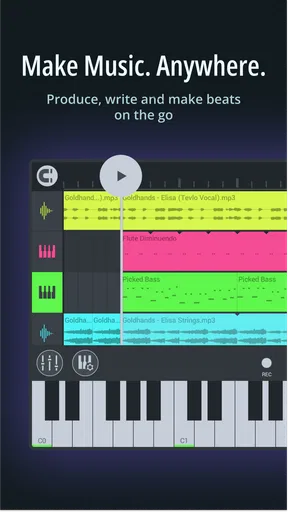
Right off the bat, FL Studio Mobile impresses with its sleek and intuitive interface. The layout is user-friendly, with everything you need right at your fingertips. Whether you’re a seasoned producer or a total newbie, navigating through its features feels like a breeze. I particularly love how the app manages to keep things organized without overwhelming you with too many options at once.
The dashboard is clean, with a vibrant aesthetic that feels both professional and approachable. You’ll find yourself quickly getting the hang of it, thanks to the logical arrangement of its tools and features. It’s like having a mini studio right in your pocket, ready to unleash your creativity wherever you are.
Building a track instead of just collecting sounds
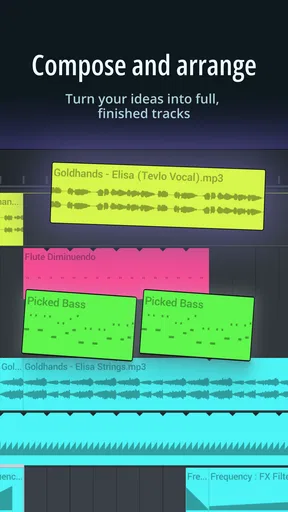
The real value for me is in combining parts: a drum pattern can establish the pulse, a melodic line can give it character, and another layer can fill out the arrangement. Multi-track editing supports that gradual process, so you can try an idea, hear it alongside the other parts, and decide whether it belongs. That is a more useful way to judge a sound than auditioning it in isolation.
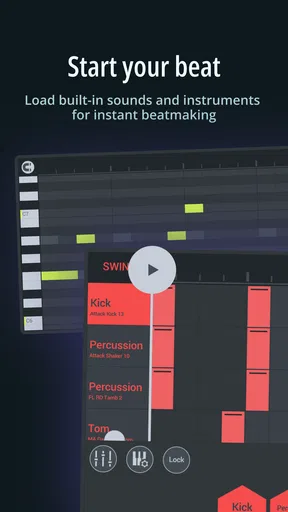
A practical workflow is to begin with a short loop rather than trying to compose a complete song immediately. I would make a basic rhythmic phrase, add one contrasting musical part, and listen for whether the two leave enough space for each other. If the result already feels crowded, adding more tracks is unlikely to solve it. On a phone, making a restrained arrangement is often more productive than chasing a complicated session that becomes difficult to navigate.
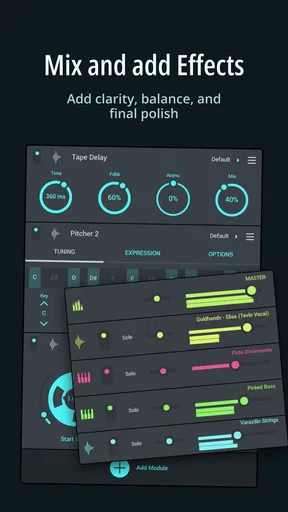
Effects such as reverb and delay can help a part feel less dry, but I would apply them with intention. A little ambience can make a sound sit more naturally in a sketch; too much can blur the rhythm and make separate layers harder to distinguish. Listening to the whole arrangement after each change is more reliable than adjusting an effect while focused only on one instrument.
Features that Strike a Chord
One of the standout features of this app is its versatility. Whether you’re into hip-hop, electronic, or classical music, FL Studio Mobile provides a rich palette of sounds and instruments to play with. The app comes packed with high-quality synthesizers, drum kits, and loops that you can tweak to your heart's content.
Another cool feature is the multi-track editing capability, which allows you to layer different sounds and instruments seamlessly. This makes it easier to experiment and find that perfect mix for your track. Plus, with its built-in effects like reverb and delay, you can add that extra polish to your creations.
Where mobile production helps—and where it asks for patience
Touch controls are convenient for trying out musical ideas quickly, especially when I want to tap in a rhythm or make a rough arrangement away from a desk. They are less comfortable for detailed edits that need repeated, precise adjustments. A MIDI controller can provide a more physical way to play or input parts, and the app supports MIDI controller compatibility, but that is most valuable if you already have a controller and a setup that makes sense to carry or connect.
That distinction matters when comparing it with desktop digital audio workstations. A desktop setup generally gives you more room for long sessions and detailed editing; a phone is easier to reach for in spare moments. I see this app as a useful place to start, sketch, or continue a mobile project, rather than an automatic replacement for every part of a studio workflow. If your main goal is fast voice recording, podcast editing, or cutting a single audio clip, a dedicated recorder or editor will likely feel more direct.
It also sits in a different lane from simple loop-making apps. Those can be quicker when you want an immediate, preset-driven result, but they may offer less of the track-building process that makes this app worthwhile. Here, the payoff comes from shaping several parts and making choices about their relationship. If you enjoy that process, the extra control is valuable; if you want a finished backing track in a few taps, it may feel like unnecessary work.
Performance and Usability
Performance-wise, I found FL Studio Mobile to be quite robust. It runs smoothly without any major hiccups, which is crucial when you’re in the zone and don’t want anything interrupting your flow. The app supports MIDI controller compatibility, which is a huge bonus if you’re someone who prefers a more hands-on approach to music production.
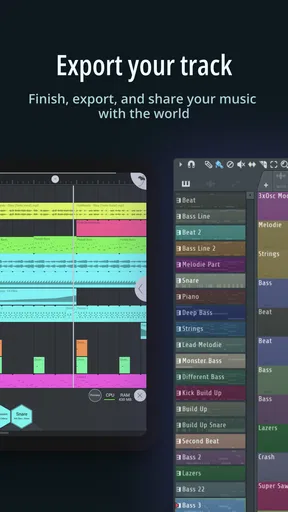
One of the things I appreciate most is the app's ability to export high-quality audio files. Whether you’re working on a full-length song or just a quick beat, you have the option to export your work in various formats, ensuring it sounds great on any platform.
Exporting is also a sensible checkpoint in a mobile workflow. I would save a version of a promising arrangement before making broad changes, then export a listening copy when I want to judge the overall balance away from the editing screen. A quick listen on headphones or another playback setup can reveal that a sound which seemed prominent while editing disappears in the full mix. That kind of check is more useful than endlessly tweaking one part in isolation.
For an everyday example, imagine catching a rhythm during a commute and entering a simple pattern before it slips away. Later, at home, you can add a bass idea and a contrasting melody, then export a draft to hear whether the sections work together. The app’s strength in that situation is continuity: the first thought can become a rough musical arrangement without waiting until you are at a computer. The limitation is that a phone session may not be the best place to finish every detail, so I would keep the goal modest and treat the sketch as a real starting point.
Room for Improvement?
While FL Studio Mobile is packed with features, there’s always room for improvement. For instance, the learning curve can be a bit steep for absolute beginners. While the interface is intuitive, the sheer number of features might feel overwhelming at first. A more comprehensive tutorial or guided walkthrough might help newbies get up to speed faster.
My advice to a beginner is to learn one task at a time: first make a beat, then add a second musical layer, then try an effect, and only after that explore more detailed arranging. Starting with every available option can turn a creative session into menu browsing. Keeping an early project deliberately small makes it easier to understand what each change does and gives you a finished sketch sooner.
Another trade-off is the difference between having many tools and knowing which one to use. A large sound palette can be inspiring, but it can also slow down a person who is still deciding what kind of music they want to make. I would choose a few sounds for a project and commit to testing them in context before searching for more. That constraint makes the arrangement easier to judge and helps prevent browsing from taking over the time meant for creating.
Additionally, while the app is quite powerful, some users might find it a bit pricey compared to other music production apps. However, considering the range of features it offers, many would argue that it’s worth the investment.
Who is likely to get their money’s worth?
I would recommend it most to people who already enjoy arranging music, beat-makers who want to work away from a computer, and beginners who are willing to learn through small experiments. It is especially appealing if you want to turn a passing musical idea into a multi-part sketch rather than merely record a voice memo. Having a MIDI controller can suit players who prefer physical input, but it is not a prerequisite for deciding whether the mobile workflow itself is enjoyable.
I would hesitate if you rarely make music, need a very simple one-purpose tool, or expect a phone screen to offer the same comfort as a full desktop workstation. It may also frustrate someone who wants guided lessons to lead every step; the learning curve rewards exploration, but that means you need some patience. Before buying, ask yourself whether you can name a project you would actually make with it. A beat for a video, a melody sketch, or a draft arrangement is a stronger reason than a vague wish to “try producing.”
Final Thoughts
All in all, FL Studio Mobile is a powerhouse of a music creation app that brings professional-grade music production to your fingertips. Whether you’re messing around with beats on a lazy Sunday or crafting an intricate composition, this app has got you covered. It’s a must-have for anyone serious about mobile music production, and I’d highly recommend giving it a try.
So, are you ready to take your music-making on the go? With FL Studio Mobile, you’re just a tap away from turning your musical ideas into reality. Happy producing!
My verdict is to buy it when you want a mobile workspace for arranging and developing music, and to skip it when your needs are limited to quick edits or casual playback. At its paid price, it makes the most sense for someone who expects to return to projects and learn the tools over time. I would start with a small track, test the workflow, and decide whether the hands-on process keeps you creating. That is the clearest way to tell whether the app earns a regular place in your music routine.
Verdict
Strengths of FL Studio Mobile
- Intuitive user interface for music creation.
- Wide range of virtual instruments available.
- Supports multi-track editing and mixing.
- Regular updates with new features.
- Cross-platform project compatibility.
Limitations of FL Studio Mobile
- In-app purchases can be costly.
- Limited export formats for free version.
- Learning curve for beginners.
- Occasional performance lags on older devices.
- Requires ample storage space for samples.
Similar Picks in This Category
View All
YouTube Music
Google LLC4.4

Samsung Music
Samsung Electronics Co., Ltd.3.8

Spotify: Music and Podcasts
Spotify AB4.3

JioSaavn - Music & Podcasts
Saavn Media Limited4.3

Lark Player:Music Player & MP3
Lark Player Studio - Music, MP3 & Video Player4.6

StarMaker: Sing Karaoke Songs
SKYWORK AI PTE. LTD.4.3
Frequently Asked Questions
Is FL Studio Mobile suitable for beginners?
Yes, FL Studio Mobile is designed to be user-friendly for both beginners and experienced users. The interface is intuitive, with plenty of tutorials and resources available online to help new users get started. Whether you’re just experimenting with music production or looking to create professional tracks, FL Studio Mobile offers a wide range of features to accommodate all skill levels.
What features does FL Studio Mobile offer?
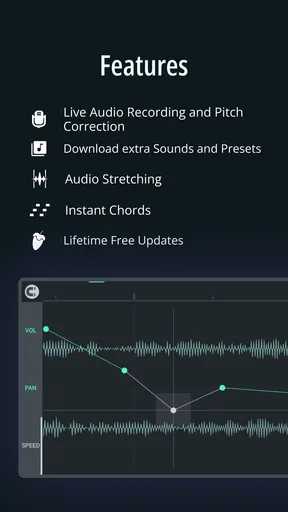
FL Studio Mobile provides a comprehensive suite of features, including a full-fledged audio recording system, multi-track editing, various effects and synthesizers, and support for MIDI controllers. It also offers a wide range of instruments and samples, a step sequencer, and an intuitive piano roll, making it a powerful tool for music creation on the go.
Can I integrate FL Studio Mobile with the desktop version?
Yes, FL Studio Mobile is designed to seamlessly integrate with the desktop version of FL Studio. You can transfer projects between devices using the FL Studio Mobile Plugin, allowing you to start a project on your mobile device and continue working on it on your desktop. This integration helps maintain a smooth workflow across platforms.
What devices are compatible with FL Studio Mobile?
FL Studio Mobile is compatible with both Android and iOS devices, including smartphones and tablets. It runs smoothly on most modern devices, but for optimal performance, it is recommended to use a device with a good processor and sufficient RAM. Always check the app's compatibility with your specific device in the app store before downloading.
Is there a cost associated with FL Studio Mobile?
Yes, FL Studio Mobile is a paid application. While it requires an initial purchase, it offers good value for the features it provides. There are no ongoing subscription fees, but additional in-app purchases are available for extra features and content. This pricing structure ensures that you get a robust music production tool without recurring costs.
